> ## Documentation Index
> Fetch the complete documentation index at: https://bytebeam.io/docs/llms.txt
> Use this file to discover all available pages before exploring further.
# R34 28-June-2025
💡 **Explore Our Latest Features**
Take a deep dive into our new features! Have questions? [**Request a Demo**](https://cal.com/kraviteja/bytebeam-101) for a personalized walkthrough.
## Important Update
The documentation has been updated! Check out the [Beta Version](https://bytebeamio.mintlify.app/getting-started/signup) and share your valuable feedback.
## DBC RBAC Enhancements
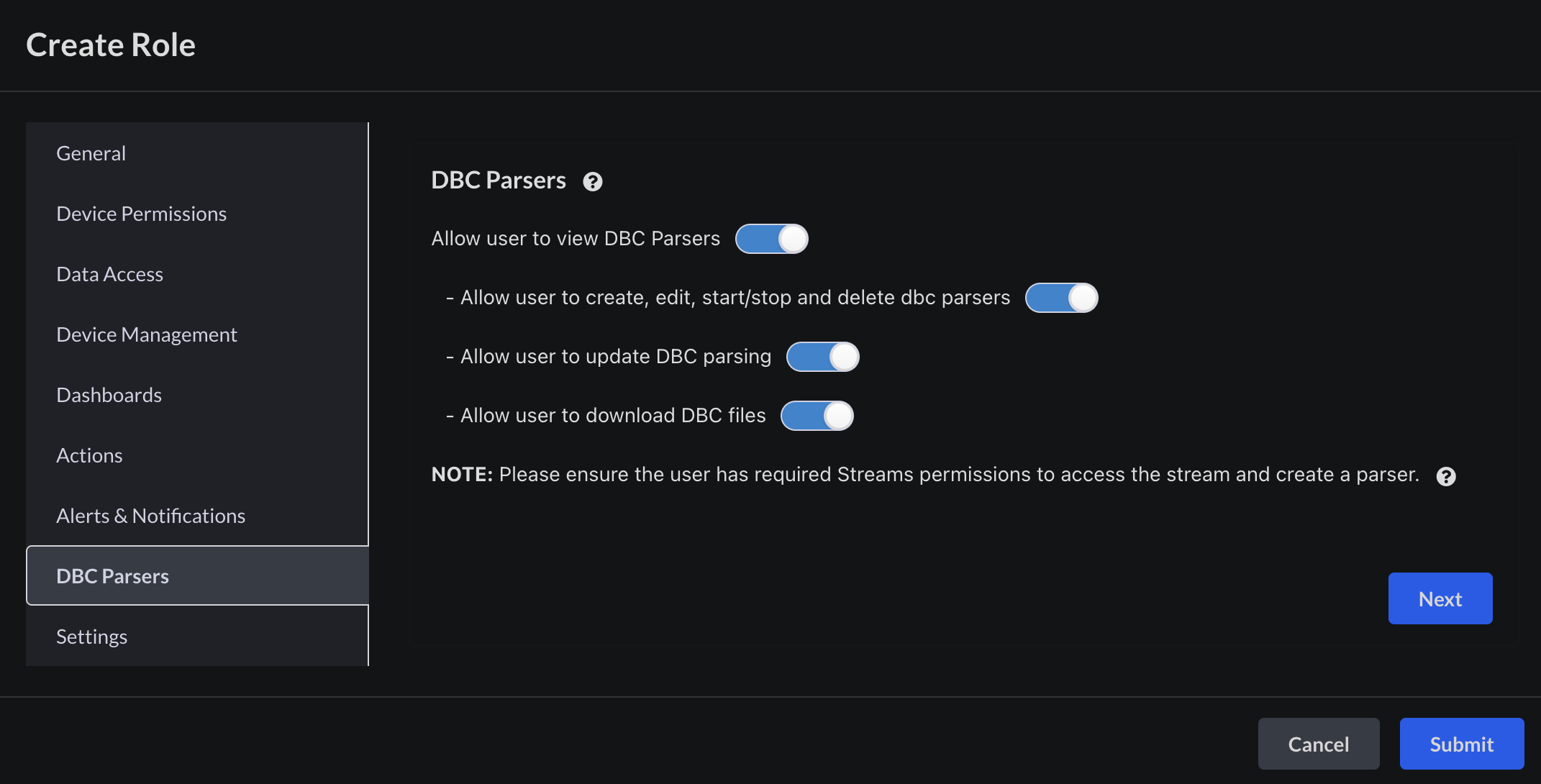 We’ve introduced Role-Based Access Control (RBAC) for the DBC Parsers section to provide granular permission management. Now, roles can be configured with fine-grained access including the ability to:
* View DBC Parsers
* Create, Edit, Start, Stop, Delete Parsers
* Update Parsers
* Download DBC Parsers
These permissions can be managed via the **Create/Edit Role** modal. Once assigned, users will only see and perform actions permitted by their role.\
Additionally, **DBC Parsers** has been moved from the **Settings** menu to the **Top Navigation Bar** for quicker access.
## Device IDs support in Alert Rules and Session Types
We’ve introduced Role-Based Access Control (RBAC) for the DBC Parsers section to provide granular permission management. Now, roles can be configured with fine-grained access including the ability to:
* View DBC Parsers
* Create, Edit, Start, Stop, Delete Parsers
* Update Parsers
* Download DBC Parsers
These permissions can be managed via the **Create/Edit Role** modal. Once assigned, users will only see and perform actions permitted by their role.\
Additionally, **DBC Parsers** has been moved from the **Settings** menu to the **Top Navigation Bar** for quicker access.
## Device IDs support in Alert Rules and Session Types
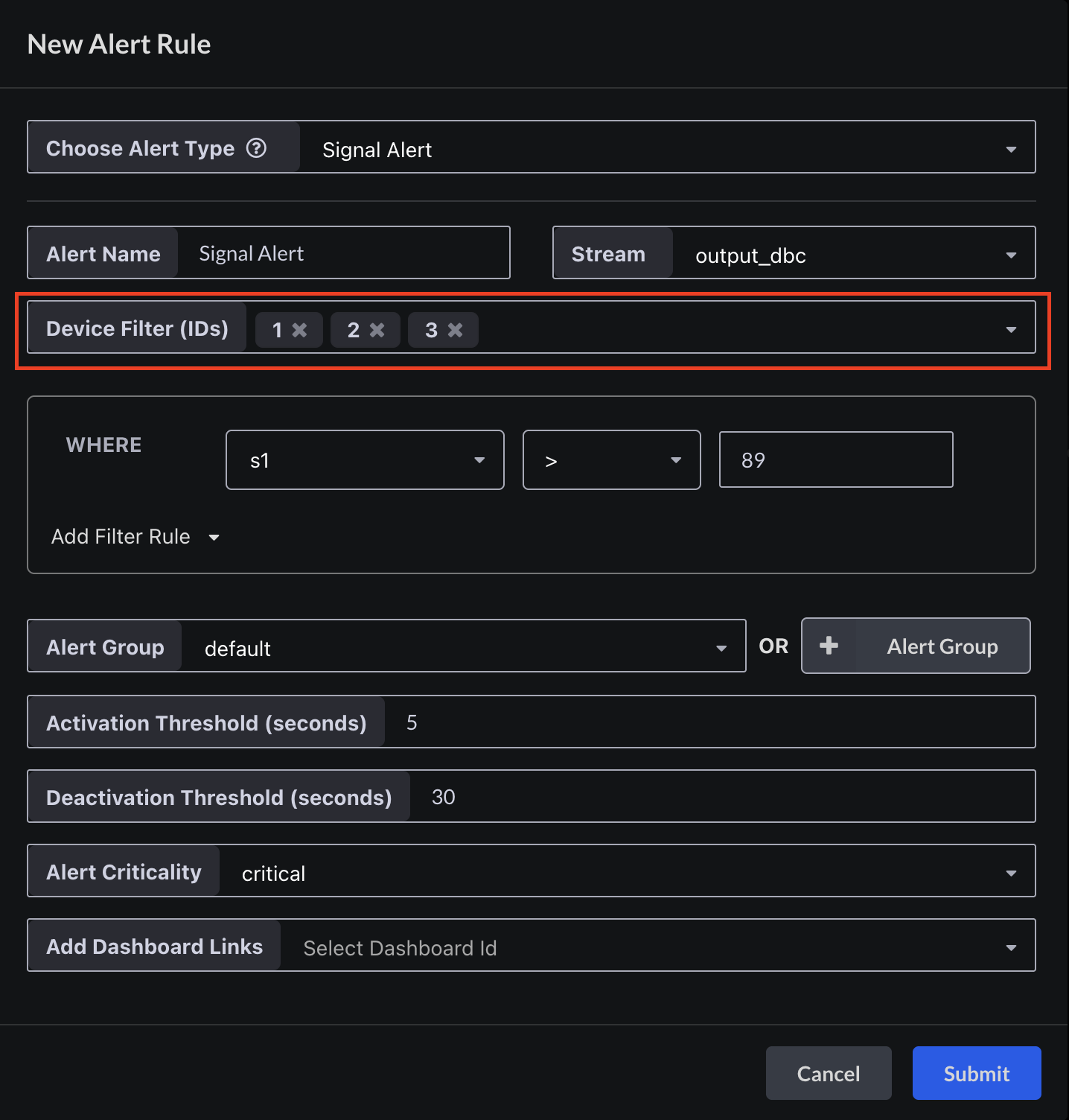 We’ve added the ability to target specific devices when configuring Alert Rules and Session types.
Instead of applying rules across all devices, users can now associate rules with selected **Device IDs** only.
This improves how precisely users can define targeting conditions. Users can view associated devices via **tooltips** by hovering over the alert rule name or session type name.
## Filtering in Notification Rules
We’ve added the ability to target specific devices when configuring Alert Rules and Session types.
Instead of applying rules across all devices, users can now associate rules with selected **Device IDs** only.
This improves how precisely users can define targeting conditions. Users can view associated devices via **tooltips** by hovering over the alert rule name or session type name.
## Filtering in Notification Rules
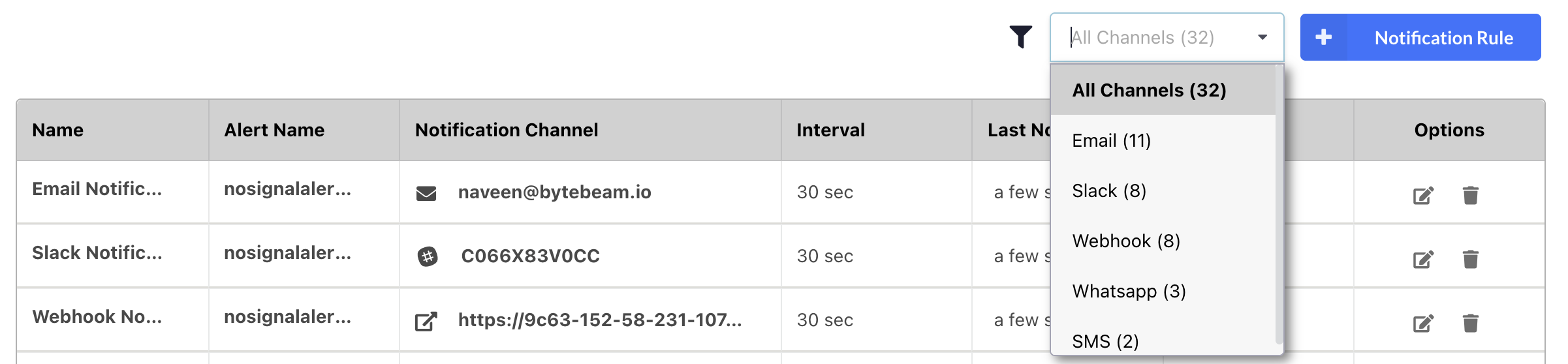 We’ve added a **channel-based filter** to the Notification Rules page to streamline rule management.
* Easily filter notification rules by their associated channel.
* A **count** is displayed next to each channel to provide a quick overview of rule distribution.
The count is displayed in **Users** section as well for Roles.
## Bug Fixes & Minor Improvements
* **Simplified Alert and Notification Rule Configuration**: Included alert rule type and channel selection directly in the Create/Edit Alert Rule and Notification Rule modals to eliminate the extra configuration step.
* **Alert Rule Count Per Group**: Displayed the alert rule count for each alert group in the Alert Rules section for better visibility and management.
* **Session Type Visibility Based on Alerts Toggle**: Automatically hide the Session Types section when the Alerts & Notifications section is disabled to keep the interface clean and context-aware.
💡 **Need More Insights?**\
Want to better understand how these features work for you? [**Request a Demo**](https://cal.com/kraviteja/bytebeam-101) and schedule a personalized session with our team.
We’ve added a **channel-based filter** to the Notification Rules page to streamline rule management.
* Easily filter notification rules by their associated channel.
* A **count** is displayed next to each channel to provide a quick overview of rule distribution.
The count is displayed in **Users** section as well for Roles.
## Bug Fixes & Minor Improvements
* **Simplified Alert and Notification Rule Configuration**: Included alert rule type and channel selection directly in the Create/Edit Alert Rule and Notification Rule modals to eliminate the extra configuration step.
* **Alert Rule Count Per Group**: Displayed the alert rule count for each alert group in the Alert Rules section for better visibility and management.
* **Session Type Visibility Based on Alerts Toggle**: Automatically hide the Session Types section when the Alerts & Notifications section is disabled to keep the interface clean and context-aware.
💡 **Need More Insights?**\
Want to better understand how these features work for you? [**Request a Demo**](https://cal.com/kraviteja/bytebeam-101) and schedule a personalized session with our team.