> ## Documentation Index
> Fetch the complete documentation index at: https://bytebeam.io/docs/llms.txt
> Use this file to discover all available pages before exploring further.
# Provisioning a Device
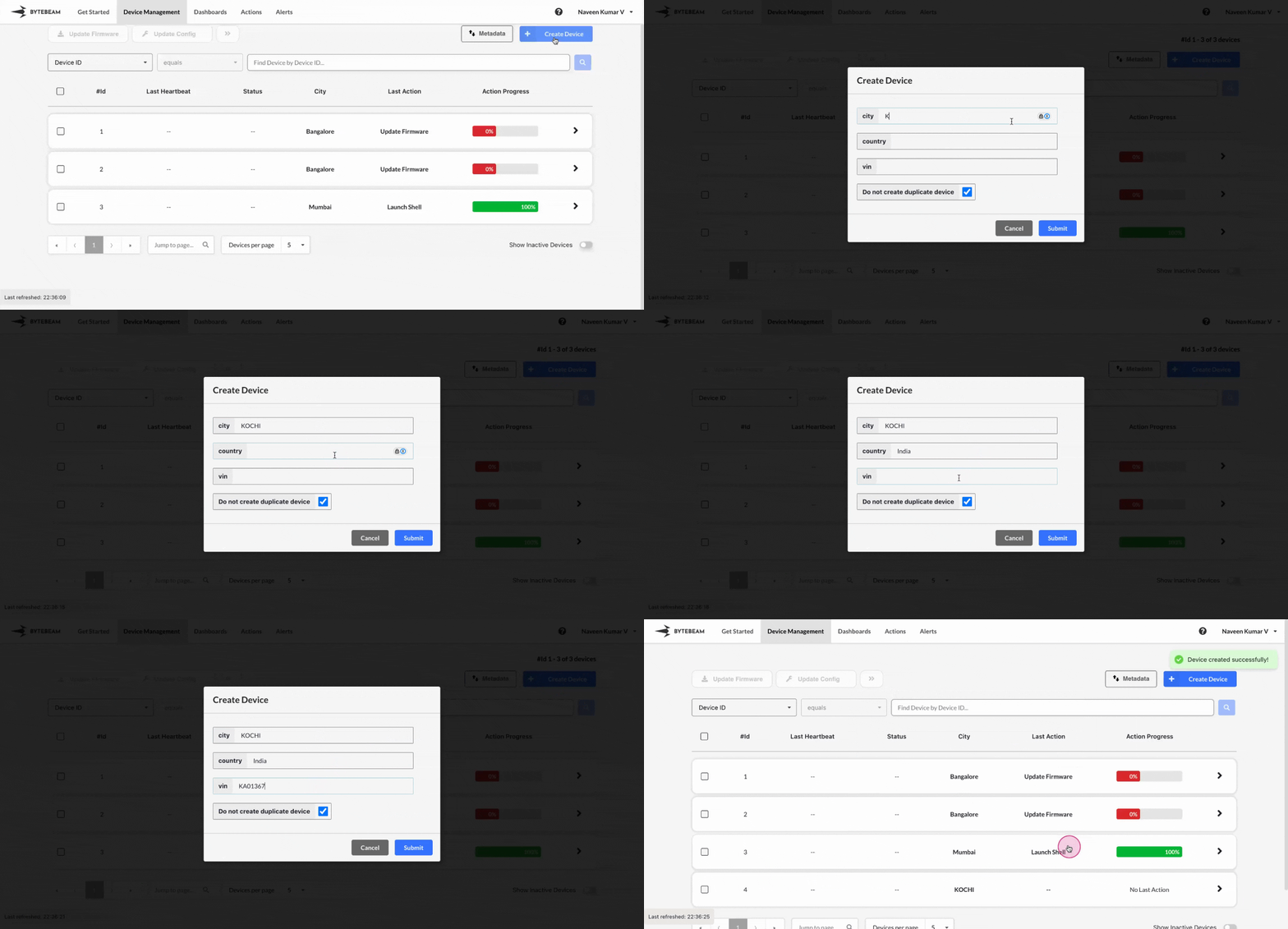
Provisioning is the initial process of setting up a device so it can communicate securely with the Bytebeam platform. During provisioning, unique identifiers, credentials, and configuration settings are generated and assigned to the device. This process includes:
**Registering the Device**: Adding the device to the Bytebeam console with its metadata and configuration details.
**Configuring Security Credentials**: Generating a configuration file that includes the necessary security credentials, such as certificates and keys, to securely authenticate the device with the platform.
**Connecting to the Cloud**: Once provisioned, the device uses the configuration file to establish a secure connection to the Bytebeam platform.
To provision a device in Bytebeam console,
Click on the **Device Management** tab at the top
Click on the **Create Device** button
Enter the values for **Metadata Keys** or Optionally, you can also
* Skip adding Metadata Key values
* Choose to create a duplicate device by unchecking the "Do not create duplicate device" option
and finally click on **Submit** button to create the device.
The device configuration file should be downloaded automatically onto your computer. The contents of the file will look similar to this:
```json JSON theme={null}
{
"project_id": "demo",
"broker": "cloud.bytebeam.io",
"port": 8883,
"device_id": "1230",
"authentication": {
"ca_certificate": "-----BEGIN CERTIFICATE-----\\n...certificate contents...",
"device_certificate": "-----BEGIN CERTIFICATE-----\\n...certificate contents...",
"device_private_key": "-----BEGIN RSA PRIVATE KEY-----\\n...key contents..."
}
}
```
This file is used by the Bytebeam device SDK to establish a connection with the Cloud platform.